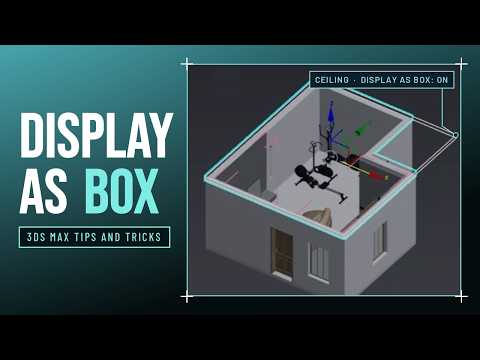
Working on interior architectural scenes in 3ds Max can often feel like a constant balancing act. To navigate inside a room or adjust camera angles, artists frequently resort to hiding the ceiling or blocking foreground walls. However, hiding these structural elements creates a major rendering issue: you lose accurate global illumination, realistic light bounces, and correct reflections during render previews.
Fortunately, there is a far better technique that keeps your lighting setup intact while providing full visibility inside your scene.
Stop Hiding Geometry: Use 'Display as Box'
Instead of hiding an object entirely, 3ds Max allows you to alter how individual geometry is displayed in your workspace. By enabling the "Display as Box" setting, you transform complex objects—such as ceilings, roofs, or outer walls—into simplified bounding boxes.
This simple tweak completely changes your workflow. The ceiling remains physically active in the 3D environment, ensuring it casts shadows and reflects light accurately during final or test renders. Meanwhile, it becomes see-through and unobtrusive, keeping your 3ds Max viewport clean and effortless to navigate.
How to Enable 'Display as Box'
Setting up this feature takes just a few clicks:
- Select the Object: Click on the ceiling or foreground object you want to modify.
- Open Object Properties: Right-click the selected object and choose Object Properties from the Quad Menu.
- Toggle Display Properties: Under the Display Properties tab, check the option for Display as Box.
- Confirm: Click OK to apply.
Once applied, your heavy geometry transforms into a lightweight bounding box, giving you a clear view of the interior furniture, lighting fixtures, and textures.
Boost Performance and Render Accuracy
Beyond visual clarity, this method offers a welcome performance boost. Heavy polygonal meshes can slow down viewport navigation. Displaying dense assets as simple boxes reduces graphic overhead, helping to maintain a smooth 3ds Max viewport frame rate even in massive, high-detail architectural scenes.
The next time you design an interior space, stop hiding your ceilings. Using display properties allows you to maintain photorealistic lighting balance while enjoying an optimized 3ds Max viewport workflow.


