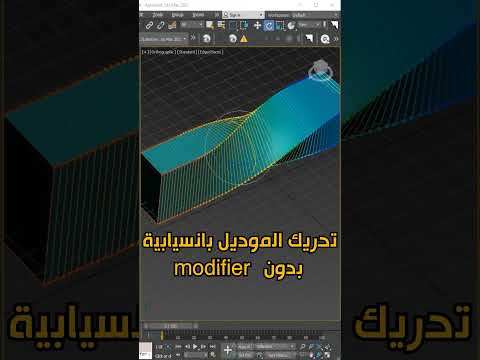
When working on complex 3D projects, achieving fluid, organic movement is often the difference between a stiff, robotic-looking scene and a professional masterpiece. For many artists, the challenge lies in moving individual vertices without creating jagged edges or unrealistic distortions. This is where the Soft Selection tool becomes an essential part of your toolkit for high-quality 3ds Max animation.
What is Soft Selection?
Soft Selection is a powerful feature in 3ds Max that allows you to select a sub-object (like a vertex, edge, or polygon) and have the transformation affect the surrounding geometry with a gradual falloff. Instead of a hard "on/off" selection, Soft Selection creates a color-coded gradient—usually ranging from red (full influence) to blue (no influence). This ensures that when you move, rotate, or scale a part of your model, the neighboring areas follow along smoothly.
Why It Matters for 3ds Max Animation
In the world of 3ds Max animation, maintaining the integrity of a mesh during deformation is crucial. Whether you are prepping a character for a rig or animating environmental assets like a waving flag or a rolling hill, Soft Selection provides the necessary "stretch" that mimics real-world physics. By using this tool, you can create subtle, secondary motions that make your objects feel more natural and weighted.
Key Settings to Master
To get the most out of Soft Selection, you need to understand its primary parameters: 1. Falloff: This determines the distance from the selected center where the influence reaches zero. A larger falloff creates a wider, smoother transition. 2. Pinch: This adjusts the "sharpness" of the selection peak. It is particularly useful when you need a more pointed deformation. 3. Bubble: This controls the curvature of the falloff. Expanding the bubble creates a more rounded, bulbous effect on the surrounding geometry.
Enhancing Your Workflow
By integrating these techniques into your daily routine, you can significantly speed up your modeling and rigging phases. Mastering the falloff curve allows you to manipulate high-poly models with ease, ensuring that every movement contributes to a more polished 3ds Max animation.
Soft Selection is more than just a modeling shortcut; it is a fundamental bridge between static geometry and fluid motion. Experiment with the Falloff and Bubble settings today to see how they can transform your 3D workflow from rigid to remarkable.


