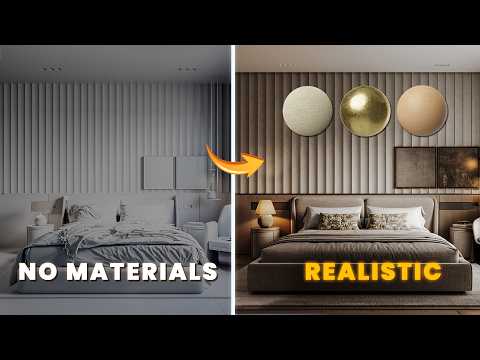
Achieving photorealism in interior rendering is a journey that moves from understanding basic geometry to mastering the art of the shader. If you have ever felt that your 3D scenes look a bit "flat" or artificial, the secret usually lies in the way you handle surface properties. In this guide, we dive into the specific workflow for creating lifelike bedroom surfaces using Corona Renderer and 3ds Max.
The Workflow of Realism
Creating high-quality 3ds Max materials requires more than just dragging and dropping a texture into a slot. It starts with understanding how light interacts with physical surfaces in the real world. To move from a basic interior to a realistic one, your workflow should always prioritize PBR (Physically Based Rendering) principles. This means paying close attention to the Diffuse, Reflection, and Glossiness maps to ensure that every object reacts naturally to the light sources in your room.
Mastering Wood and Soft Surfaces
In a bedroom scene, wood is often a primary element, appearing in flooring, bed frames, and bedside tables. By utilizing the advanced shading system for 3ds Max materials, you can layer high-resolution textures with sophisticated bump and displacement maps. This level of detail allows you to simulate the subtle grain of the wood and the way it catches highlights. Similarly, fabric materials for blankets and pillows require a soft falloff (using the Corona Fuzz or Falloff map) to mimic the way light grazes the edges of cloth, adding that essential "cozy" feel to the render.
Optimizing with Corona Renderer
One of the biggest advantages of working with Corona is its interactive rendering capability. This feature makes the process of fine-tuning your 3ds Max materials incredibly efficient. Instead of waiting for a final render to see if your floor is too shiny or your curtains are too opaque, you can see these changes in real-time. This iterative process is what separates a standard project from a professional-grade architectural visualization. By focusing on the small imperfections—like subtle scratches or varied glossiness—you bring a sense of history and "lived-in" reality to your digital space.


