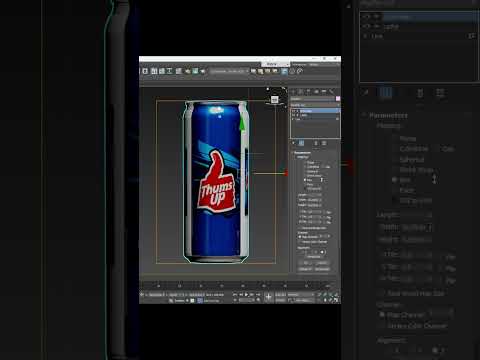
Modeling everyday objects is one of the best ways to sharpen your skills as a 3D artist. Whether you are a beginner or a seasoned professional, understanding how to streamline your workflow is key to productivity. In this guide, we will explore a quick and efficient method for creating a classic beverage container, such as a Thums Up can, using 3ds Max. By mastering the Lathe modifier, you can transform simple 2D profiles into complex 3D geometry in just a few clicks.
Starting with the Profile (Spline)
The secret to a perfect cylindrical object lies in its cross-section. Instead of starting with a standard 3D primitive like a cylinder, it is often more precise to use the Line tool. In the Front or Left viewport, draw a 2D spline that represents half of the can’s silhouette.
Focus on the subtle details: the slight inward curve at the base, the vertical body, and the tapered neck leading to the top rim. In 3ds Max, taking the time to refine your vertex points at this stage ensures that your final model looks professional and photorealistic once rendered.
Applying the Lathe Modifier
Once your 2D spline is ready, it is time for the magic to happen. With the spline selected, navigate to the Modifier List and choose "Lathe." This tool takes your profile and rotates it 360 degrees around a designated axis to create a solid volume.
Initially, the model might look inside out or collapsed. To fix this, look at the "Align" settings in the parameters rollout and toggle between Min, Center, and Max. To ensure the surface is perfectly smooth, increase the "Segments" count (usually 32 or 64 works well) and check the "Weld Core" box to prevent any geometry artifacts at the center of the model.
Refining for Production
With the basic shape established, you can add an Edit Poly modifier on top of the stack to refine the details. This is where you can model the recessed bottom of the can or the opening on the top lid. This non-destructive workflow is one of the many reasons 3ds Max remains an industry standard; you can always go back down the modifier stack to adjust the original spline if the proportions need tweaking.
By utilizing these techniques, you can rapidly build a library of high-quality assets for product visualizations or architectural scenes. Mastering the Lathe tool is a fundamental step in becoming a faster, more versatile 3D modeler.


