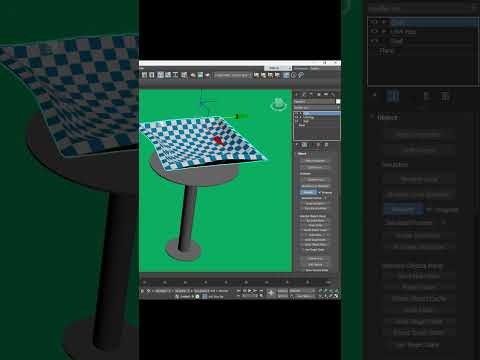
Creating realistic fabric dynamics is an essential skill for modern 3D artists, especially in architectural visualization and interior design. Whether you are rendering a cozy dining room or an elegant banquet scene, adding a natural-looking tablecloth can significantly elevate the visual quality of your render. Mastering fabric dynamics in 3ds Max is surprisingly straightforward once you understand how to harness its powerful built-in physics tools.
In this guide, we will walk you through the simple steps to simulate a perfectly draped tablecloth using the Cloth modifier.
Step 1: Setting Up Your Geometry
Before running a simulation, you need a solid geometry foundation:
* The Collision Surface: Create your table model where the cloth will rest.
* The Fabric Plane: Place a simple Plane primitive directly above the table.
Pro Tip: Ensure your plane has sufficient length and width segments (e.g., 40x40 or higher). A denser polygon grid allows the fabric to bend smoothly and form realistic folds.
Step 2: Configuring Object Properties
With both objects in place, select the plane and apply the Cloth modifier from the modifier list. The built-in Cloth modifier in 3ds Max allows you to simulate natural gravity and real-world material behaviors effortlessly.
- Click on Object Properties inside the Cloth modifier rollout.
- Select your plane object, set it to Cloth, and choose a material preset such as Cotton, Silk, or Linen.
- Click Add Objects, select your table from the list, and mark it as a Collision Object. Adjust the offset slightly to prevent geometry clipping.
Step 3: Running the Simulation
Scroll down to the Simulation group and click Simulate Local. You will instantly see gravity pull the cloth downward, draping naturally over the table's edges and creating realistic wrinkles. Stop the simulation once you are happy with the visual flow of the folds.
Step 4: Final Polish
To complete the look, add a Shell modifier to give the cloth realistic physical thickness, and finish with a TurboSmooth modifier to round out any remaining sharp edges.
By utilizing these simple techniques, creating believable textiles in 3ds Max becomes a fast and enjoyable process. Try tweaking different fabric presets to craft unique cloth styles for your next render!


