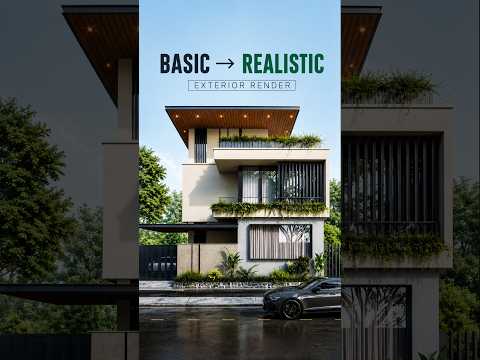
Have you ever looked at your architectural rendering and felt it looked a bit too flat, artificial, or uninspiring? You are not alone. Creating a realistic exterior scene requires more than just building 3D geometry; it demands careful attention to lighting, material details, and realistic composition. With the right techniques in 3ds Max, you can easily elevate a basic, lifeless model into a stunning, photorealistic architectural visual.
Here are the key areas you need to adjust to fix your basic exterior renders and achieve a dramatic before-and-after transformation.
1. Fine-Tune Your Camera Angles and Composition
A common mistake in beginner renders is using unrealistic camera heights or extreme focal lengths. In real-world architectural photography, camera placement plays a crucial role in storytelling. Try adjusting your camera to eye level and applying vertical tilt correction. This simple tweak immediately creates a grounded, professional perspective that draws the viewer into the scene naturally.
2. Upgrade Lighting and Material Depth
Flat lighting and default shaders are often the main culprits behind unrealistic renders. To create a dramatic improvement in 3ds Max, replace static sun systems with dynamic HDRI lighting setups to capture authentic atmosphere and realistic environmental reflections. Additionally, make sure your materials feature realistic roughness, normal maps, and surface imperfections. Subtle details like worn concrete or reflective glass surfaces make a world of difference.
3. Elevate the Scene with Realistic Landscaping
An exterior building visual always looks incomplete without natural surrounding context. Adding high-quality foliage, trees, grass, and ground cover fills dead space and breathes life into the visualization. Using scatter tools within 3ds Max allows you to distribute varied vegetation effortlessly, adding natural randomness without slowing down your workflow.
Final Thoughts
Achieving photorealism does not require starting from scratch. By making strategic adjustments to your camera, lighting, materials, and landscaping, you can turn any basic project into a high-end architectural showcase. Apply these simple tweaks to your next visual and experience the transformation for yourself!


