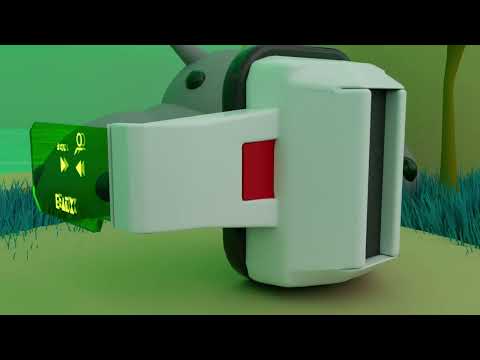
"It’s over 9,000!" Whether you are a die-hard anime fan or a budding 3D artist, the iconic Scouter from Dragon Ball Z is a piece of technology that needs no introduction. This wearable computer, used by Frieza’s army to measure power levels, is more than just a prop; it is a fantastic subject for honing your hard-surface modeling skills. In this article, we explore the process of recreating this legendary gadget using the powerful features of 3ds Max.
Mastering the Curves and Components
The DBZ Scouter is a unique blend of organic curves and sharp, mechanical lines. When you start your project, the first step is always gathering high-quality reference images from various angles. To achieve that polished, professional look, you need to focus on clean topology.
Begin by blocking out the main earpiece using primitive shapes like cylinders and boxes. By utilizing the robust toolset within 3ds Max, specifically the Edit Poly modifier, you can begin to extrude faces and bevel edges to give the device its characteristic ergonomic feel. Pay close attention to the transition between the head strap and the main unit, as this is where many beginners struggle with mesh flow.
Detailing the Iconic Lens
The most recognizable part of the Scouter is undoubtedly the colored, translucent lens that hovers over the wearer's eye. This component requires a delicate touch to look authentic. You should create a thin, curved plane and apply a Shell modifier to give it physical depth.
Inside the viewport of 3ds Max, you can then assign a translucent material with high glossiness to mimic the high-tech glass seen in the series. Don't forget to model the small hinges and the "readout" buttons on the side of the earpiece. These small details are what separate a generic model from a high-quality fan art piece.
Final Polishing and Rendering
Once your geometry is solid, it is all about the finishing touches. Check your smoothing groups to ensure the light hits the surface naturally without any weird artifacts. Whether you are aiming for a battle-worn look with scratches and scuffs or a factory-fresh finish, the modeling foundation is key.
By the time you hit the render button, you will have a high-quality asset ready for your portfolio or an animation project. Modeling classic anime gear is a great way to push your creative boundaries and see exactly what you can achieve with a professional 3D toolkit.


