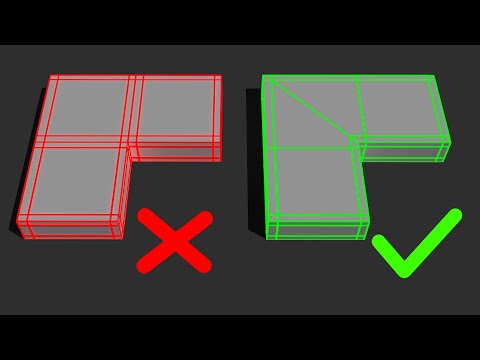
Mastering 3D modeling requires far more than simply sculpting visual shapes; it demands a deep understanding of clean topology. Whether you are building assets for video games, architectural visualization, or cinematic visual effects, proper polygon flow is essential for seamless subdivision, rigging, and rendering. If you are a beginner leveraging the 3ds Max student version to learn industry-standard workflows, mastering mesh flow early on will give your work a competitive edge.
Here are the essential topology tips every aspiring 3D artist should integrate into their modeling pipeline.
1. Embrace Quads and Eliminate N-Gons
Four-sided polygons (quads) are the gold standard in 3D modeling. They subdivide predictably and deform smoothly during animation. While triangles (tris) are acceptable in specific real-time game art contexts, N-gons (polygons with more than four sides) frequently cause severe shading artifacts and rendering errors. Always re-route your edges to keep your mesh composed primarily of quads.
2. Maintain Consistent Polygon Density
Uneven distribution of polygons can cause noticeble shading issues and unpredictable mesh behavior under modifiers. Ensure that face sizes remain relatively uniform across your model. When building complex assets using powerful tools like the 3ds Max student version, balanced edge density helps preserve visual quality without causing performance lag.
3. Guide Edge Loops Along Deformation Lines
If you plan to animate a character or a mechanical asset, your edge loops must follow natural muscle or mechanical articulation lines. Placing support loops strategically around bending points—such as shoulders, knees, and facial features—ensures the mesh deforms smoothly without stretching or collapsing.
4. Catch Light with Bevels and Support Loops
In hard-surface modeling, infinitely sharp 90-degree edges rarely exist in the real world. Use bevels or holding loops near hard edges to capture ambient specular highlights. This small detail dramatically boosts realism and gives your renders a high-end, tactile quality.
5. Practice Clean Mesh Habits Early
Fixing messy geometry late in a project takes significantly more time than doing it right from the beginning. Take full advantage of retopology tools, symmetry modifiers, and clean extrusions. Developing good mesh hygiene while training on educational packages, such as the 3ds Max student version, builds strong habits that top studios actively seek in junior artist portfolios.
Conclusion
Clean topology is the true backbone of professional 3D content creation. By focusing on quad-based geometry, smart edge placement, and consistent mesh density, you will produce clean, optimized assets ready for any production pipeline.


